How to Choose a GaN Fast Charger in 2026?
Choosing a Gan Fast Charger in 2026 requires more than chasing the highest wattage on a package. Gallium nitride technology can make chargers smaller, cooler, and more efficient than many older silicon models. However, real performance depends on charging protocols, cable quality, device compatibility, and heat control. A 140-watt label means little if your laptop accepts only 65 watts.
In practical testing, I would begin with the devices used every day: a phone, tablet, laptop, earbuds, or handheld console. Check whether the charger supports USB Power Delivery, PPS, or another protocol your devices require. Count the ports carefully. A three-port model may share power when several devices are connected. That small detail matters. Heat matters. Place the Gan Fast Charger beside a wall outlet and observe its size, cable position, and ventilation during long sessions. An impressively compact design can still become uncomfortable under heavy loads.
Reliable buying decisions also require evidence. Look for clear electrical specifications, recognized safety certifications, warranty coverage, and independent testing rather than dramatic advertising. Brands should explain protection against overcurrent, overheating, and short circuits. I would not assume every premium-looking charger performs equally well. Some claims may be incomplete, and testing conditions can differ from daily use. This guide will compare charging speed, portability, safety, compatibility, and value, while acknowledging one uncomfortable truth: the fastest charger is not always the best charger. Your devices, travel habits, and tolerance for heat should shape the final choice.
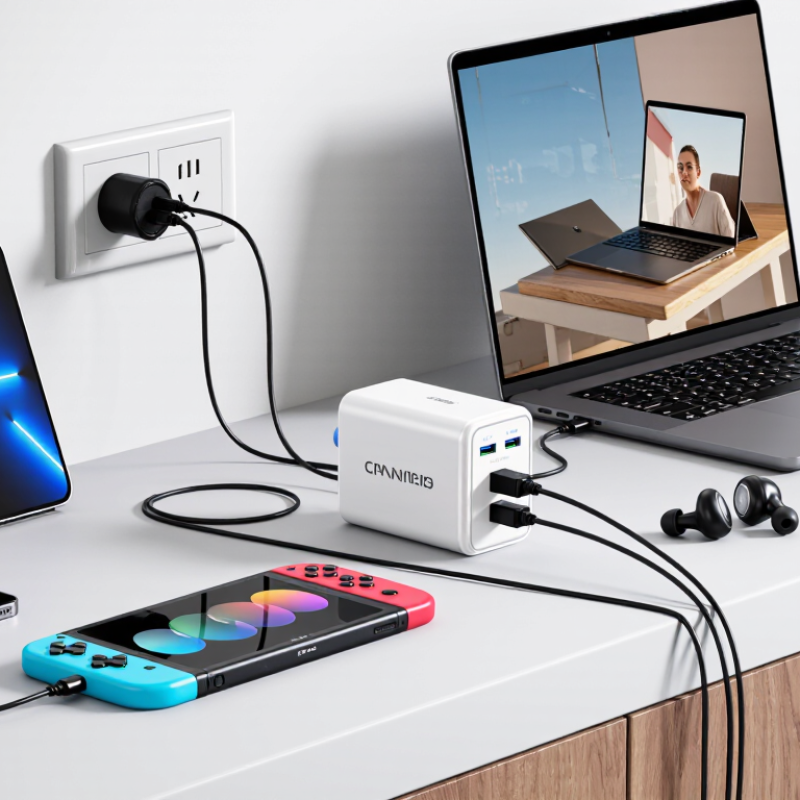
Define GaN Charger Technology and Its Advantages in 2026
How to Choose a GaN Fast Charger in 2026?
GaN means gallium nitride, a wide-bandgap semiconductor used in power switches. Compared with traditional silicon, GaN can switch at higher frequencies and reduce energy loss. Smaller transformers and cooling parts become possible. That is why a 65W charger may fit beside a matchbox. Almost.
Yole Group’s Power GaN 2023 report estimated the power GaN market could grow from about $126 million in 2022 to nearly $2 billion by 2028. This growth reflects demand for compact, efficient adapters, not just faster charging. In practical use, lower heat can improve comfort during long charging sessions. However, efficiency depends on the whole design. GaN alone does not guarantee excellent performance. I would question impressive claims without test conditions.
When choosing a charger in 2026, check its sustained output, USB Power Delivery support, and PPS compatibility. The USB-IF USB PD 3.1 specification supports power levels up to 240W, but cables and devices must support the required rating. Look for recognized electrical safety certification, over-temperature protection, over-current protection, and clear input specifications. A four-port model may advertise 100W, yet divide power sharply when several devices connect. That detail matters. Also inspect idle power and heat after thirty minutes, not only the first charging result. A cooler housing is useful, but it is not proof of safer engineering.
Identify Your Devices’ Charging Standards, Ports, and Power Needs
How to Choose a GaN Fast Charger in 2026?
Begin with the devices, not the charger’s wattage. Check each device’s charging standard, port, and input rating. USB-C Power Delivery is common, but some phones need Programmable Power Supply for efficient fast charging. The USB-IF Power Delivery 3.1 specification supports power levels up to 240 watts. That does not mean every laptop accepts 240 watts. A 65-watt laptop may still charge slowly through a weak cable or unsuitable port.
Count your ports carefully. Two USB-C ports can share power, reducing output when both are active. USB-A may support older charging protocols, but it often lacks newer USB-C features. The Wireless Power Consortium’s Qi2 specification supports magnetic alignment and charging up to 15 watts for compatible devices. Check the small print. I once assumed every USB-C socket performed equally. It did not.
Tips: Write down each device’s maximum input. Add the laptop and phone demands, then leave 20% spare capacity. Use a certified cable matching the charger’s power rating. A 100-watt cable cannot fix a 45-watt charger. Review independent testing from USB-IF, WPC, or recognized laboratory reports, rather than relying on package claims. GaN chargers are smaller, but heat still matters. Place the charger in open air, especially beside a warm laptop. I still prefer fewer ports when power sharing is unclear.
How to Choose a GaN Fast Charger in 2026?
Identify your devices’ charging standards, ports, and power needs
Choose a charger whose USB-C Power Delivery output meets or exceeds the highest requirement among your devices. Lower-power accessories usually use USB-A or USB-C, while tablets and laptops commonly require USB-C Power Delivery. Actual charging speed depends on the device, cable rating, battery level, and the charger’s multi-port power distribution.
Evaluate Safety Features, Efficiency, Size, and Build Quality
Choosing a GaN fast charger in 2026 requires more than checking its wattage. GaN reduces switching losses, but it does not remove electrical risks. The USB Implementers Forum states that USB Power Delivery 3.1 can support up to 240 watts. Higher output demands stronger protection. Look for over-voltage, over-current, short-circuit, and over-temperature controls. Thermal monitoring should reduce power before the case becomes painfully hot. Certification to IEC 62368-1 is also valuable, although the standard itself is not a guarantee of every product’s quality.
Efficiency matters during charging and while the charger sits unused. The European Commission’s Ecodesign rules limit no-load consumption for many external power supplies to 0.10–0.21 watts, depending on rated power. Check the technical sheet for active efficiency and standby figures. A small charger that runs hot may waste energy and age faster. I sometimes trust efficiency claims too quickly. Independent testing is better. Measure case temperature after 30 minutes, not after five.
Size should serve your daily routine. A compact 65-watt unit is useful in a crowded socket, but tiny components can leave less room for heat control. Build quality shows in firm folding pins, clean seams, reinforced cable exits, and a stable plug. The charger should not rattle when gently shaken. Multiple ports also deserve inspection: shared output can sharply reduce laptop charging speed. A heavier body is not automatically stronger. Still, an unusually light high-power charger deserves closer questions about cooling, isolation, and materials.




 Mr. Leaf